> For the complete documentation index, see [llms.txt](https://docs.payler.com/api/llms.txt). Markdown versions of documentation pages are available by appending `.md` to page URLs; this page is available as [Markdown](https://docs.payler.com/api/general-information/introduction.md).
# Introduction
The Payler Merchant API allows you to perform a standard set of e-commerce operations, operations of funds transfer from a merchant account to a client card according to one of the selected interaction schemes:
1. Provided that you enter bank card data on the merchant’s page ([Merchant scheme](#merchant-scheme));
2. Provided that you enter bank card information on the Payler Gateway page ([Gate scheme](#gate-scheme)).
{% hint style="info" %}
Using the Merchant scheme requires the merchant to comply with the requirements of the PCI DSS standard.
{% endhint %}
## PCI DSS
The Payment Card Industry Data Security Standard (PCI DSS) is a payment card industry data security standard developed by the Payment Card Industry Security Standards Board established by the IGC of Visa, MasterCard, American Express, JCB, and Discover.
PCI DSS aims to protect customer data from unauthorized access and reduce the risk of fraudulent transactions when processing online payments.
The standard establishes requirements and recommendations that all trade and service enterprises (merchants) must follow when working with confidential payment data.
Before the merchant system starts processing sensitive data, it is necessary to determine the exact requirements that a particular solution must meet. Requirements are primarily determined based on information about the projected volume of transactions that will be processed by the system over a 12-month period.
[**Learn more about PCI DSS levels**](https://usa.visa.com/support/small-business/security-compliance.html)
Completion of a Self-Assessment Questionnaire (SAQ) is usually part of the requirements.
[**Learn more about SAQ**](https://listings.pcisecuritystandards.org/documents/Understanding_SAQs_PCI_DSS_v3.pdf)
{% hint style="info" %}
For additional advice on interaction within the framework of one or another of the proposed schemes, you can contact the Payler technical support service.
{% endhint %}
## Types of operations
### **Payment**
Operation of funds transfer from the user's card account to the merchant's account.
* One-stage payment—after authorization, payment amount is blocked on cardholder's account and automatically debited after 24 hours. This type of payment is set by default for all merchants integrated in the system.
* Two-stage payment—after authorization, payment amount is blocked on the cardholder's account, but writing off happens only after operation approval by the merchant. This payment type is set by merchant request.
### **Transfer**
Operation of funds transfer from the merchant's account to the user's card one.
## Operation performing process
### Gate Scheme
#### **Payment (gapi)**
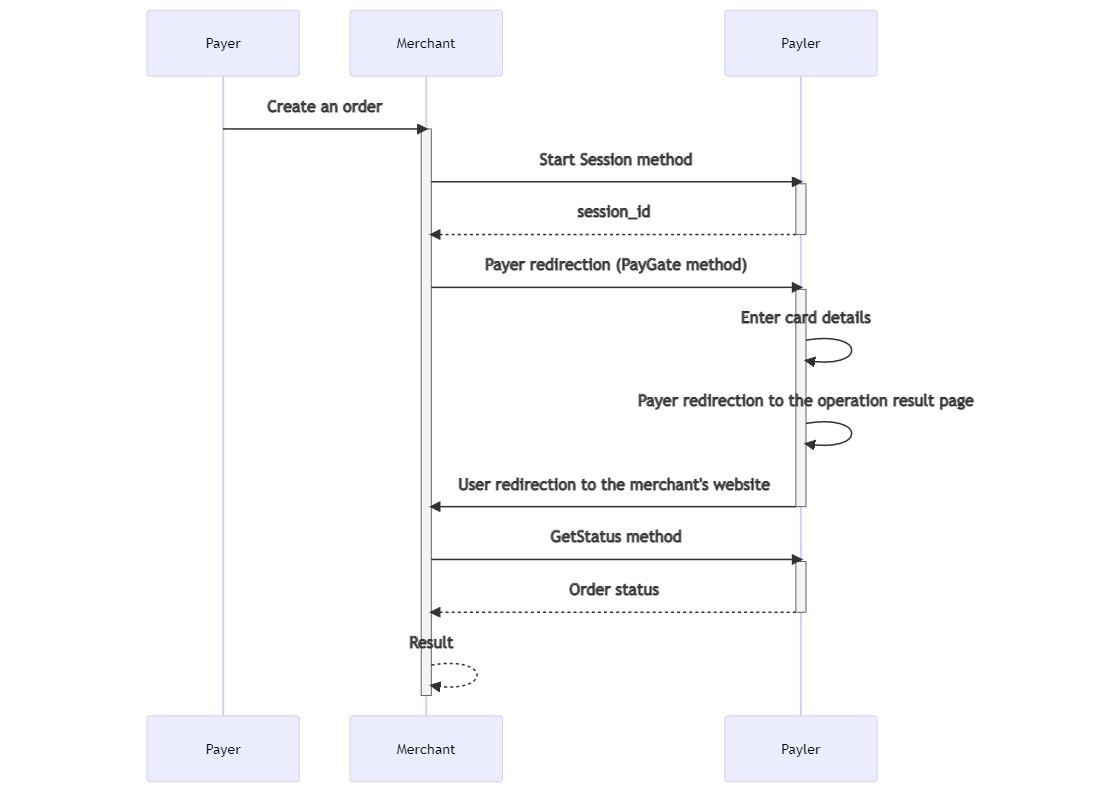
Payment process is as follows:
1. Merchant calls [StartSession](/api/api-methods/payments.md#startsession) API method to create a payment session;
2. Merchant redirects the user to the payment page ([PayGate](/api/api-methods/payments.md#paygate));
3. User enters card details and sends them. By default, up to 5 payment attempts are available to the user. Number of attempts can be individually changed by merchant's request. If necessary, the payment gateway redirects the user to the issuing bank page for entering a confirmation code [(3-D Secure](/api/general-information/general.md#3d-secure));
4. After payment is completed, the user is redirected to the merchant’s website, a predefined address;
5. When the user is returned, the merchant calls [GetStatus](/api/api-methods/payments.md#getstatus) API method to check the status of the order.
Payment. Gate scheme
#### **Transfer (cgapi)**
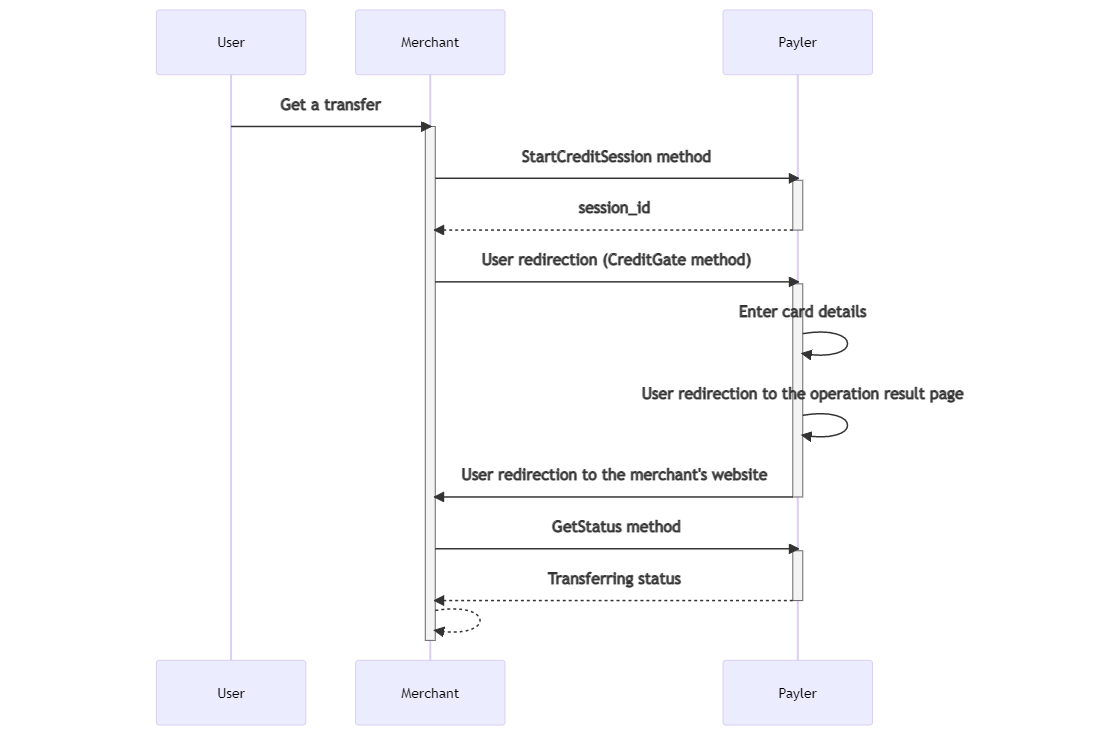
Process of transferring funds is as follows:
1. Merchant calls [StartCreditSession](/api/api-methods/transfers.md#startcreditsession) method to create a transfer session;
2. Merchant redirects the user to the transfer page ([CreditGate](/api/api-methods/transfers.md#creditgate)).
3. User enters card details and sends them;
4. After transfer is completed, the user is returned back to to merchant’s website, a pre-determined address;
5. When the user is returned, the merchant calls [GetStatus](/api/api-methods/payments.md#getstatus) method to check the status of the transferring.
Transfer. Gate scheme
### Merchant Scheme
#### **Payment (mapi)**
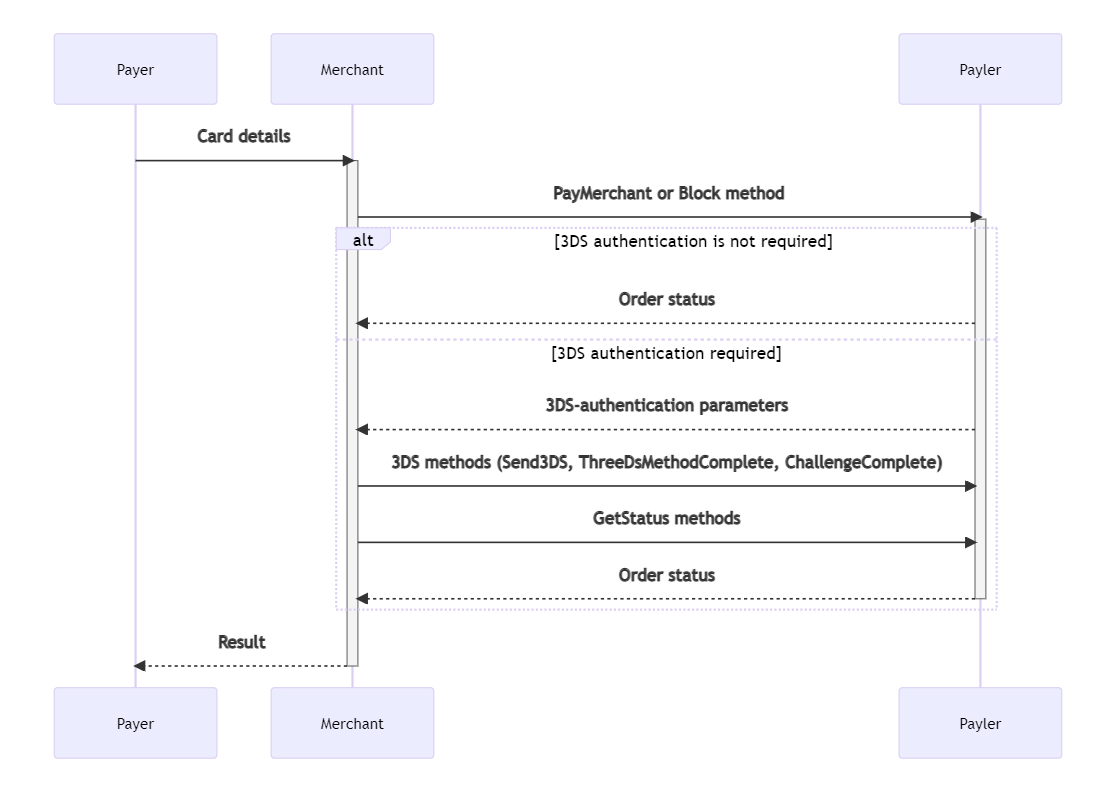
Payment process is as follows:
1. User enters card details on the merchant’s website.
2. Merchant calls [PayMerchant ](/api/api-methods/payments.md#paymerchant)or [Block](/api/api-methods/payments.md#block) method, depending on the type of payment.
3. If it is necessary to pass additional authentication using 3D-Secure, depending on the 3DS protocol used, the merchant makes additional [Send3DS](/api/api-methods/payments.md#send3ds), [ThreeDsMethodComplete](/api/api-methods/payments.md#_toc64642118), [ChallengeComplete](/api/api-methods/payments.md#challengecomplete) requests.
4. After payment is completed, merchant calls the [GetStatus](/api/api-methods/payments.md#getstatus) method to check the status \
of the order.
Payment. Merchant scheme
#### **Transfer (cmapi)**
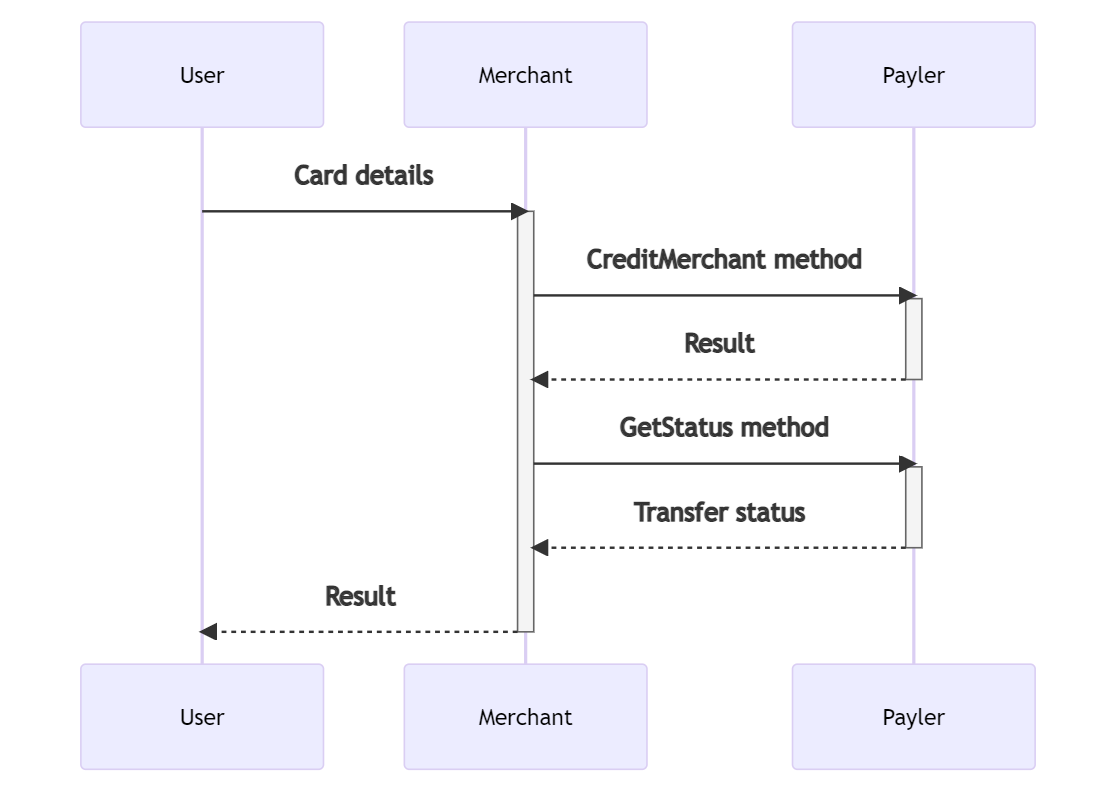
Process of transferring funds is as follows:
1. User enters card details on the merchant’s website.
2. Merchant calls [CreditMerchant](/api/api-methods/transfers.md#creditmerchant) method.
3. After payment is completed, the merchant calls the [GetStatus](/api/api-methods/payments.md#getstatus) method to check the status \
of the transfer. In rare cases, the user may not return to the merchant's website, for example, \
if they close the browser window immediately after payment, or they lose access to the Internet. To always find out about changes in the status of an order, the merchant can set up receiving guaranteed notifications ([callback](/api/general-information/general.md#guaranteed-notifications)).